
In this lesson we’re covering the basics of how to edit photos from scratch in lightroom (without using any presets).
We’ll look at how to nail your exposure using the exposure slider contrast, whites, blacks, highlights & shadows. Then we’ll look at getting the white balance correct by adjusting the color temperature and tone. Finally we’ll show you how you can get creative and take your photos to the next level using selective color editing and split toning.
We’ll be teaching you this lesson on Adobe Lightroom which is part of the $10 per month Photography Package in Adobe Creative Cloud. If you want to give it a go you can download a free trial here. While we’re teaching using Lightroom, these skills apply on just about any editing tool and there are plenty of free options out there if you aren’t ready to invest in Lightroom just yet.
Today’s activity
Today we want you to first have a go at editing the photos that Emile provided. If you are using the free version of lightroom mobile, then you’ll need to edit the jpeg image. If you are using lightroom for desktop or have a paid adobe membership, you can edit the raw image.
First see how close you can get to matching this example image…
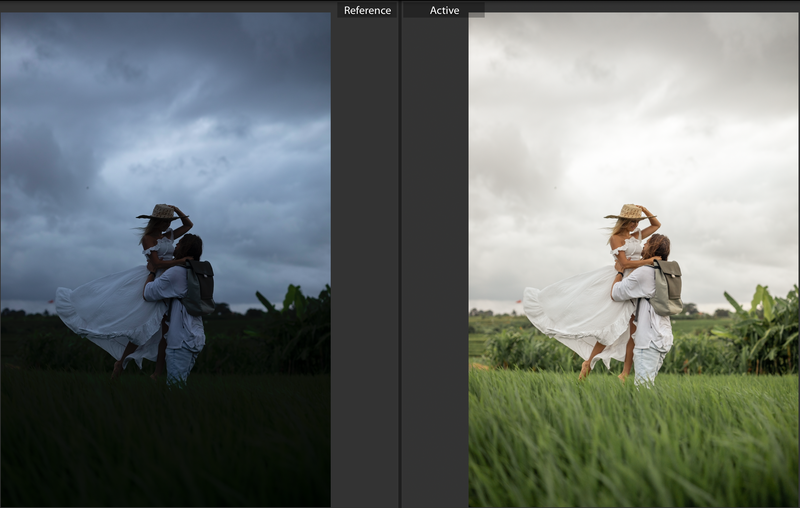
Then you can get creative and see what you come up with!
After that if you want to have a go at editing some of your images that you have shot in previous days, go for it!
Practice makes perfect.
-———
Having trouble viewing the video?
Our videos are hosted with vimeo which is blocked in a few countries, including Indonesia. If you are having trouble viewing it, try using a VPN.
For a free VNP app try 1.1.1.1 for mobile devices and betternet for desktop.